Pexels stock image for "static API documentation tool" - Photo by ThisIsEngineering on Pexels
Great developer experience often starts with great documentation. For companies with public APIs, providing clear, fast, and reliable documentation isn’t just a courtesy, it’s a critical driver of adoption. A slow or confusing documentation site can stop developers in their tracks, while a great one can accelerate integration and build trust. This is where a static API documentation tool becomes essential, offering a powerful combination of speed, security, and simplicity that modern development teams need.
A static API documentation tool is a program that takes your API specification files, like OpenAPI or AsyncAPI, along with Markdown content and transforms them into a complete website made of plain HTML, CSS, and JavaScript files. Unlike dynamic sites that build pages on demand by querying a database, a static site is pre built. The entire documentation website is generated once, during your development process, and then deployed to a hosting provider.
This approach aligns perfectly with the “docs as code” philosophy, where documentation is written, versioned, and managed in the same repository as your application’s source code. This integration ensures your docs are always in sync with your API, as they are part of the same review and deployment pipeline.
Choosing a static approach for your API documentation offers significant advantages over traditional, dynamic systems. These benefits directly impact your developer experience and operational efficiency.
Static websites are incredibly fast because they serve pre rendered HTML files directly from a server or, even better, a Content Delivery Network (CDN). There are no databases to query or server side code to execute. This results in near instant page loads, which is crucial for a good user experience and has a positive impact on SEO rankings. In fact, a page load delay of just a few seconds can cause a significant percentage of users to leave.
By eliminating server side processing and database connections on the live documentation site, static sites drastically reduce the available attack surface. Common vulnerabilities like SQL injections or server side exploits are simply not a concern for the documentation site itself, making a static API documentation tool an inherently more secure choice.
Static sites have fewer moving parts. They are simpler to build, deploy, and maintain. Hosting is significantly cheaper, as you don’t need powerful servers or database management. Many platforms even offer generous free tiers for hosting static assets, and they can handle massive traffic spikes without any complex scaling configurations.
With a docs as code workflow, your documentation is versioned in Git right alongside your API. This creates a single source of truth and a clear audit trail for every change. Developers can update documentation in the same pull request where they modify an endpoint, ensuring accuracy and consistency.
After exploring the foundational aspects of API documentation, it’s time to dive into the specific tools that bring these principles to life. This section highlights the top 10 static API documentation tools that excel at generating clean, user-friendly, and maintainable documentation from your API specifications. These tools are grouped together because they streamline the process of creating beautiful, pre-rendered documentation sites, which offer benefits in performance, security, and simplicity.
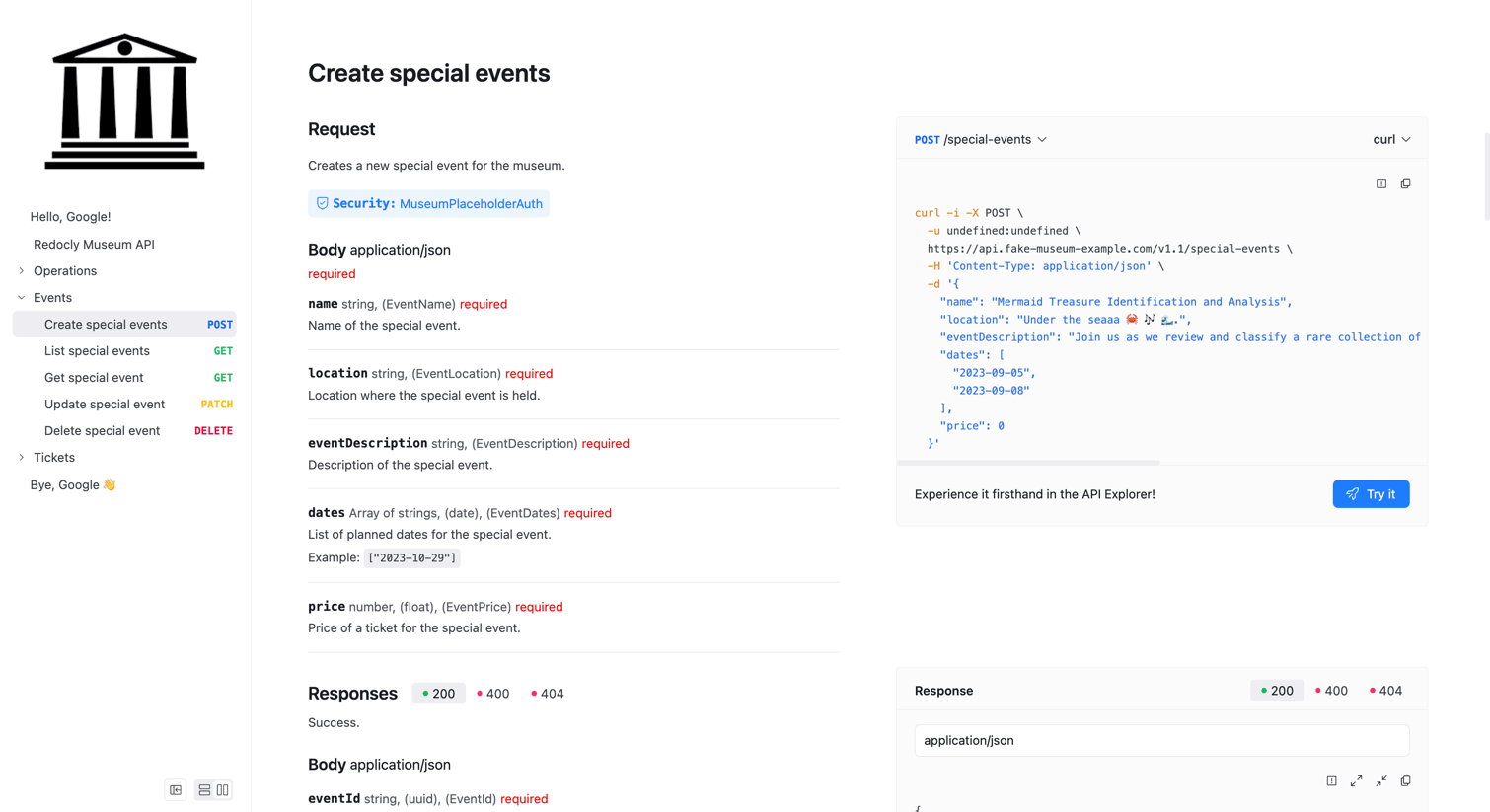
Redoc is an open-source tool that generates clean, modern API reference documentation from OpenAPI specifications. It is best known for its instantly generated, responsive three-panel design that presents navigation, content, and code samples in a clear, synchronized view without requiring extensive configuration or complex setup.
Redoc is a free, open-source (MIT license) tool designed for self-hosting. Its commercial counterpart, Redocly, offers a SaaS platform with premium features.
OpenAPI 3.1/3.0/2.0
AsyncAPI (basic support)
Markdown (in description fields)
The open-source version focuses on rendering beautiful, read-only documentation and does not include a built-in interactive console.
Customization is handled via a theme object for configuring colors, fonts, and spacing.
The open-source tool renders a single API specification; advanced versioning and governance features like automated linting are part of Redocly’s paid platform.
Redoc integrates into any development workflow via its command-line interface, making it simple to bundle documentation into a static HTML file within a CI/CD pipeline.
Install the CLI tool via npm: npx @redocly/cli build-docs.
Point the tool to your openapi.yaml source file.
Configure basic options.
Run the build command to generate a single static HTML file.
Publish the static output.
The tool generates a zero-dependency, static HTML file containing a single-page application (SPA), which provides a fluid user experience.
Best Feature: It automatically generates an elegant three-panel layout from an OpenAPI spec.
Free and open-source with a permissive MIT license.
Produces a beautiful, responsive, and highly readable three-panel design out of the box.
Excellent rendering support for OpenAPI specifications, including complex nested schemas.
Simple CLI-based setup integrates easily into automated CI/CD workflows.
The open-source version lacks an interactive “Try It” console for making API calls.
Customization options are limited compared to more extensible documentation frameworks.
Performance may degrade when rendering extremely large and complex OpenAPI files.
Teams that need to generate beautiful, read-only documentation quickly.
Projects prioritizing a clean, professional look with minimal configuration.
Redoc produces best-in-class, static API reference documentation with almost no effort.
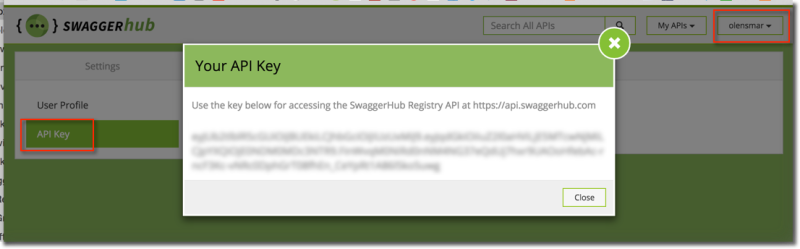
Swagger UI is an open-source tool that dynamically generates beautiful, interactive API documentation directly from an OpenAPI Specification. As a dependency-free collection of HTML, JavaScript, and CSS assets, it can be deployed in virtually any environment to allow users to visualize and directly interact with live API resources.
It’s a free, open-source tool under an Apache 2.0 license, designed primarily for self-hosting. A commercially hosted version is also available within SwaggerHub.
OpenAPI 3.0/2.0
AsyncAPI
Its core strength is the interactive “Try it out” console, which allows developers to execute live API calls from the docs.
It provides extensive customization options, including theming, layout changes, and robust support for custom CSS.
Versioning is managed by using separate OpenAPI specification files or by carefully organizing endpoints within a single file using tags and paths.
It integrates seamlessly into CI/CD pipelines for automated documentation deployment and serves as a core component of the broader Swagger tooling ecosystem.
Download the release and copy the /dist folder’s contents to a server.
Update the default index.html to point to your OpenAPI specification URL.
Deploy.
The tool generates a client-side single-page application (SPA) from static HTML, CSS, and JS assets that visualizes the API.
Best Feature: Its interactive console for making live API calls.
Pros:
Automatically generates an interactive user interface directly from an OpenAPI specification.
Strong standards support and a massive, active open-source community for help.
Highly customizable using themes and CSS overrides to match company branding guidelines.
Simplifies API testing and debugging for all consumers.
Cons:
The interface can feel cluttered and slow with very large API specifications.
Advanced customization requires significant technical effort and expertise in web technologies.
It is strictly for API reference and lacks features for long-form content.
Best for:
Teams who need to quickly generate interactive API documentation.
Projects designed around the OpenAPI Specification.
Self-hosted, open-source documentation requirements.
It excels at transforming OpenAPI specifications into user-friendly, interactive documentation.
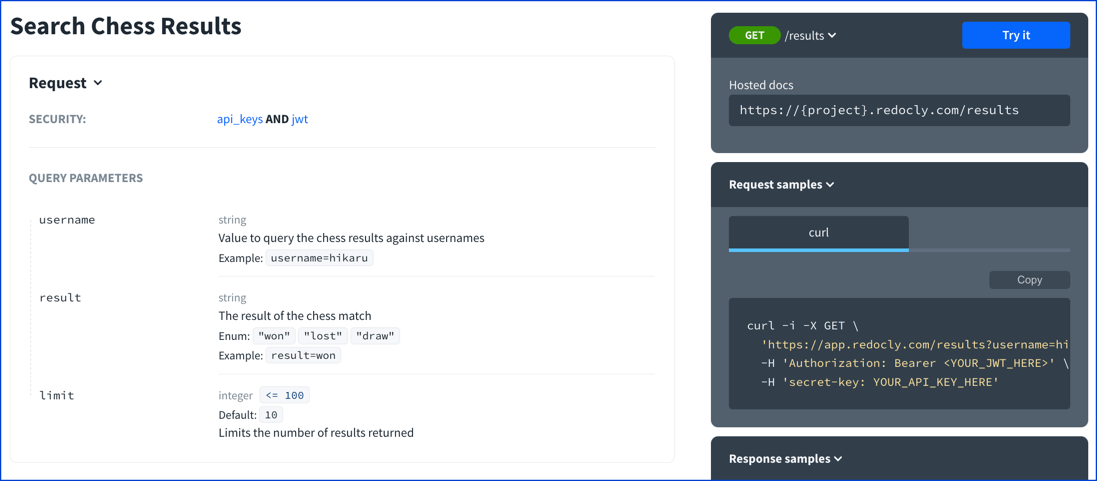
Redocly is a comprehensive API documentation platform that transforms OpenAPI definitions into clean, interactive, and highly customizable documentation. Known for its polished three-panel design and docs-as-code workflow, it enables teams to manage and version their documentation alongside their API source code directly from Git repositories.
Redocly offers a free, open-source version alongside a premium SaaS platform with managed hosting, enterprise security, and advanced features on paid tiers.
OpenAPI 3.1/3.0/2.0
AsyncAPI
GraphQL
Markdown
Webhooks
Its premium interactive “Try it” console allows users to make live API calls with multiple authentication flows.
Extensive branding is supported via configuration files, CSS variables, and custom React component overrides.
It excels at versioning through Git integration, enabling automated deployments, API linting, and style guide enforcement to ensure design consistency.
Its docs-as-code approach ensures a seamless fit with Git-based CI/CD pipelines, supported by a VS Code extension and analytics.
Install the CLI.
Point to your OpenAPI definition.
Configure redocly.yaml.
Run the build command.
Publish the static output.
Redocly generates a fast, SEO-friendly static HTML file as a single-page application (SPA), with premium options for enhanced performance.
Best Feature: The docs-as-code workflow automates publishing.
Generates a polished, responsive three-panel documentation site with extensive OpenAPI support.
Powerful customization, theming, and governance features with configurable linting rules.
Seamless integration with CI/CD pipelines for fully automated builds and deployments.
The interactive “Try it” console and other advanced features require a premium subscription.
The learning curve can be steep compared to simpler tools; advanced customization requires React knowledge.
Teams fully committed to a docs-as-code methodology.
Organizations that require strong API governance and style consistency.
It uniquely combines automation, governance, and deep customization features.
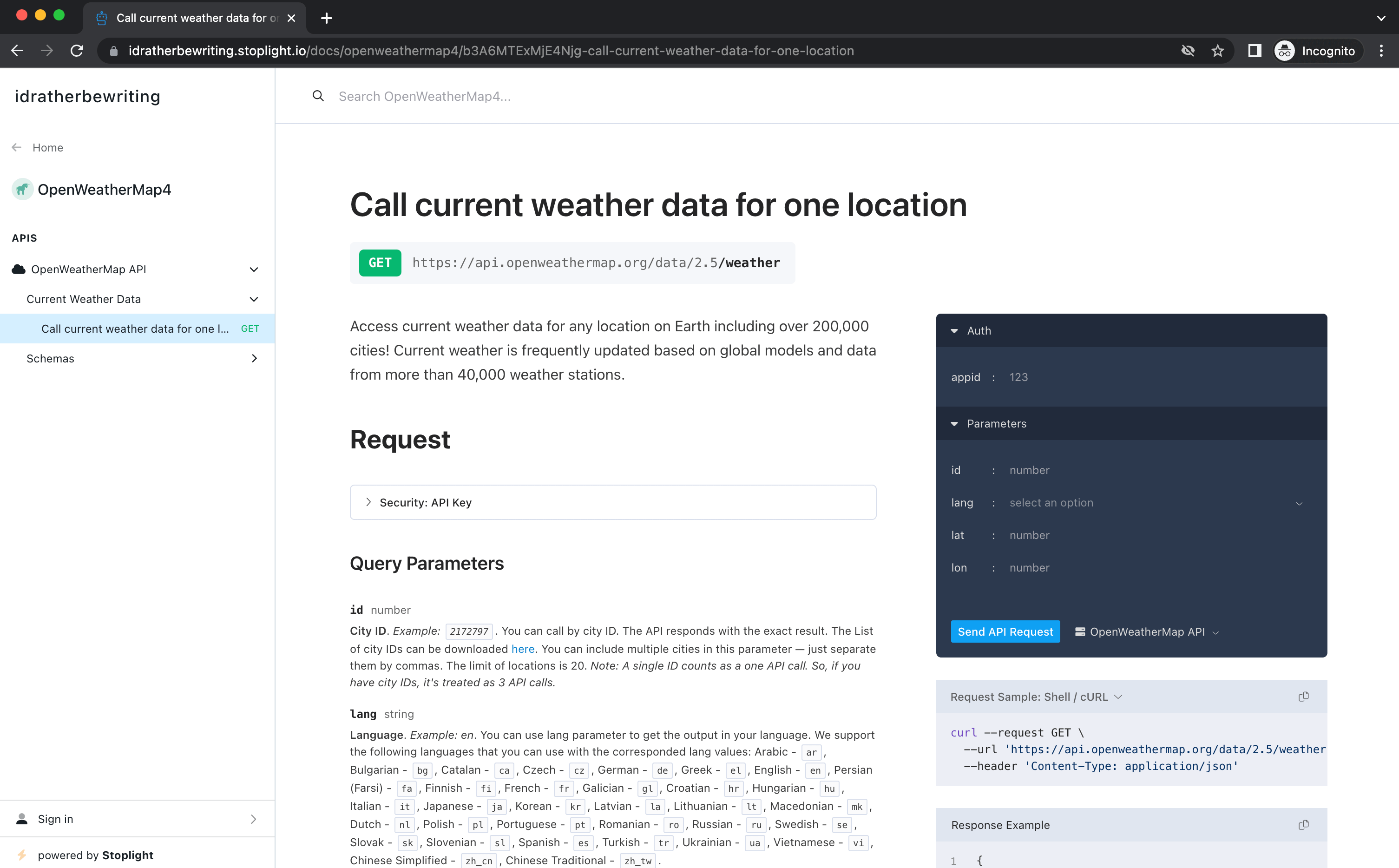
Stoplight Elements is an open-source toolkit of embeddable React and Web Components for creating interactive API reference documentation. It integrates directly into existing websites or portals, offering Stripe-like layouts for displaying documentation generated from OpenAPI and Markdown files, providing a highly flexible and modern documentation experience.
The core Elements toolkit is open-source and free for self-hosting. Full platform features, including hosted docs, are available via paid Stoplight plans.
OpenAPI 3.1/3.0/2.0
Markdown
JSON Schema
Webhooks
Its interactive console lets users make live API requests and view responses, with auto-generated code samples provided.
Supports custom logos and layouts, with deep customization possible via React or web component overrides.
Integrates with the Stoplight platform for versioning and changelogs. It uses the open-source Spectral linter for enforcing API style guide consistency.
Designed for a Git-based workflow, Elements integrates with CI/CD pipelines and the Stoplight Studio editor provides a live preview experience.
Install the npm package.
Embed the component in your app.
Point it to an OpenAPI spec URL.
Configure layout/routing.
Deploy via CI/CD.
Elements renders a client-side single-page application (SPA), providing a rich user experience that may require server-side rendering for optimal SEO.
Best Feature: Highly embeddable and interactive API documentation components.
Excellent OpenAPI v3.1 support and interactive “Try It” console.
Embeddable in any JavaScript or HTML-based site for maximum flexibility.
Offers a modern, customizable three-column documentation layout out-of-the-box.
Strong integration with the broader Stoplight ecosystem for design and governance.
Advanced customization has a steep learning curve for developers.
Lacks a built-in static site generator, as it is a library.
Default client-side rendering may have negative SEO implications without SSR.
Teams needing to embed API docs into an existing portal or CMS.
Projects requiring a highly customizable, modern, and interactive front-end.
Elements excels at building standardized API docs inside existing properties.

Scalar is a modern, open-source tool that generates beautiful and interactive API documentation from OpenAPI specifications. Positioned as a stylish alternative to Swagger UI and Redoc, it provides a clean interface, a built-in REST API client, and numerous framework integrations for easy deployment.
Primarily self-hosted and open-source (MIT license), Scalar also offers an optional hosted service with free and paid tiers for additional features.
Supported specifications: OpenAPI 3.1/3.0, Swagger 2.0, and custom x-scalar extensions for features like environments.
The integrated “Try It” feature allows users to make API requests directly within the documentation, supporting various authentication flows like bearer tokens.
Customization is supported through themes, CSS variables, and custom CSS injection for extensive branding control.
Versioning is handled by pointing Scalar to different OpenAPI documents, while custom extensions allow for defining environments and displaying endpoint stability badges.
It integrates seamlessly into Git-based CI/CD workflows and offers packages for frameworks like React, Vue, and various backend environments like .NET and Express.
Install the necessary package (e.g., npm install @scalar/api-reference or dotnet add package Scalar.AspNetCore).
Import the module into your application.
Point it to your OpenAPI specification URL.
Configure themes or options.
Deploy your application.
Scalar generates a highly performant, single-page application (SPA) output, often embedded directly within an existing web application for a seamless user experience.
Best Feature: The built-in interactive API client is beautifully designed, fast, and highly intuitive.
Pros
Modern, clean, and aesthetically pleasing user interface.
Excellent performance and fast load times.
Free and open-source with a permissive MIT license.
Extensive integrations for easy setup in many popular frameworks.
Generates code samples in multiple languages.
Cons
Fewer advanced governance features than large, enterprise-focused platforms.
As a newer tool, the community is smaller than Swagger’s.
Customization beyond themes requires some knowledge of CSS or JavaScript.
Best for
Teams seeking a modern, developer-friendly alternative to Swagger UI.
Projects that prioritize documentation aesthetics and performance.
Integrating API references directly into existing applications and frameworks.
Official link: https://github.com/scalar/scalar
Scalar excels by offering a superior developer experience through beautiful design and modern interactivity.
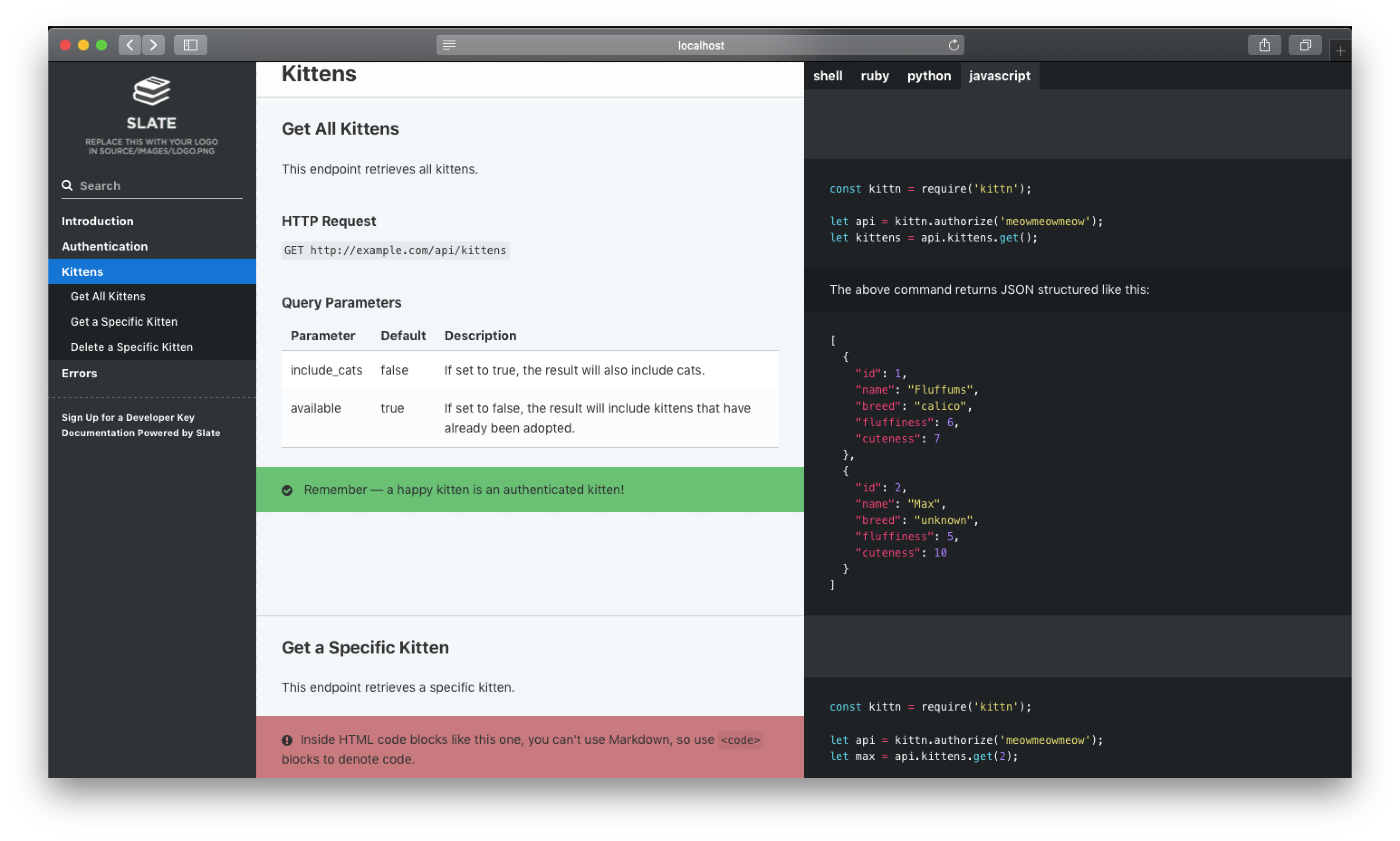
Inspired by Stripe, Slate is a static site generator that produces beautiful, responsive, single-page API documentation. It features a clean, three-panel design with your API description on the left and code examples on the right. Its simplicity and single-page navigation make it exceptionally user-friendly.
Slate is a free, open-source tool. It’s self-hosted by default, designed for easy and free deployment using GitHub Pages.
Markdown
OpenAPI/Swagger (via converter)
Slate lacks a native “Try It” console but provides beautiful syntax highlighting for over 100 different programming languages.
Customization is handled by modifying SCSS stylesheets and simply replacing the default logo and favicon.
Versioning and governance are managed entirely through standard Git workflows, allowing for easy tracking of changes and collaboration on documentation updates.
Its workflow is Git-centric, integrating smoothly into CI/CD pipelines for automated deployments and facilitating developer contributions through standard pull requests.
Fork the repository and install dependencies.
Edit source Markdown files.
Build and deploy via GitHub Pages or another host.
Slate is a Ruby-based static site generator that outputs a single-page HTML application from your source Markdown files.
Best Feature: Its exceptionally clean and responsive three-column design.
Presents an exceptionally clean, responsive, and intuitive three-panel layout.
Authoring is straightforward with a pure Markdown-based workflow.
Includes syntax highlighting for over 100 languages out-of-the-box.
Can be hosted for free using GitHub Pages.
No built-in interactive “Try It” console for API endpoints.
Performance can degrade with extremely large, single-page documents.
The local development environment requires a Ruby installation, which can be a hurdle.
Lacks a plugin ecosystem for extensibility.
Teams that want a simple, clean, single-page documentation experience.
Projects with a Markdown-first approach to authoring developer content.
Slate stands out for its elegant and user-friendly design.
DapperDox is an open-source API documentation generator that creates rich, browsable reference websites. It is designed to combine OpenAPI specifications with detailed Markdown guides and diagrams, allowing authors to overlay content directly onto the auto-generated reference documentation for a cohesive user experience.
DapperDox is a free, open-source tool, making it a cost-effective solution for developers and businesses of all sizes.
OpenAPI 2.0.
RAML.
GitHub Flavored Markdown.
The tool includes a built-in API explorer that allows for experimentation with API endpoints directly from the documentation pages.
Customization is a key feature, offering multiple themes and the ability to create your own for branding purposes.
DapperDox supports documenting multiple API specifications as a suite of products, enabling cross-referencing between them to manage different versions.
It integrates with GitHub for content authoring and can act as a proxy for a developer platform to handle API key management.
Download and unpack the latest release for your operating system.
Point the tool to your OpenAPI or Markdown source directory via the command line.
Customize the look and feel by choosing from existing themes or creating a new one.
Run DapperDox, which starts a local server to serve the documentation.
Publish the generated static content to any web server.
DapperDox generates a static website, serving browsable reference documentation that is easy to host and access.
Best Feature: Seamlessly combines API specifications with rich Markdown guides into a single, cohesive documentation site.
Pros:
Completely free and open-source.
Merges multiple OpenAPI files and Markdown content effectively.
Highly customizable with theming options.
Simple to set up and use for generating organized documentation.
Cons:
Lacks some advanced features like interactive testing and automated code generation.
Updates can be irregular, and the tool is considered less mature than some alternatives.
Limited automation capabilities, requiring manual updates for documentation.
Best for:
Developers needing to create well-organized, navigable documentation for complex projects.
Teams that want full control over the structure and styling of their documentation.
It stands out by enabling authors to create a highly integrated and customized documentation experience.
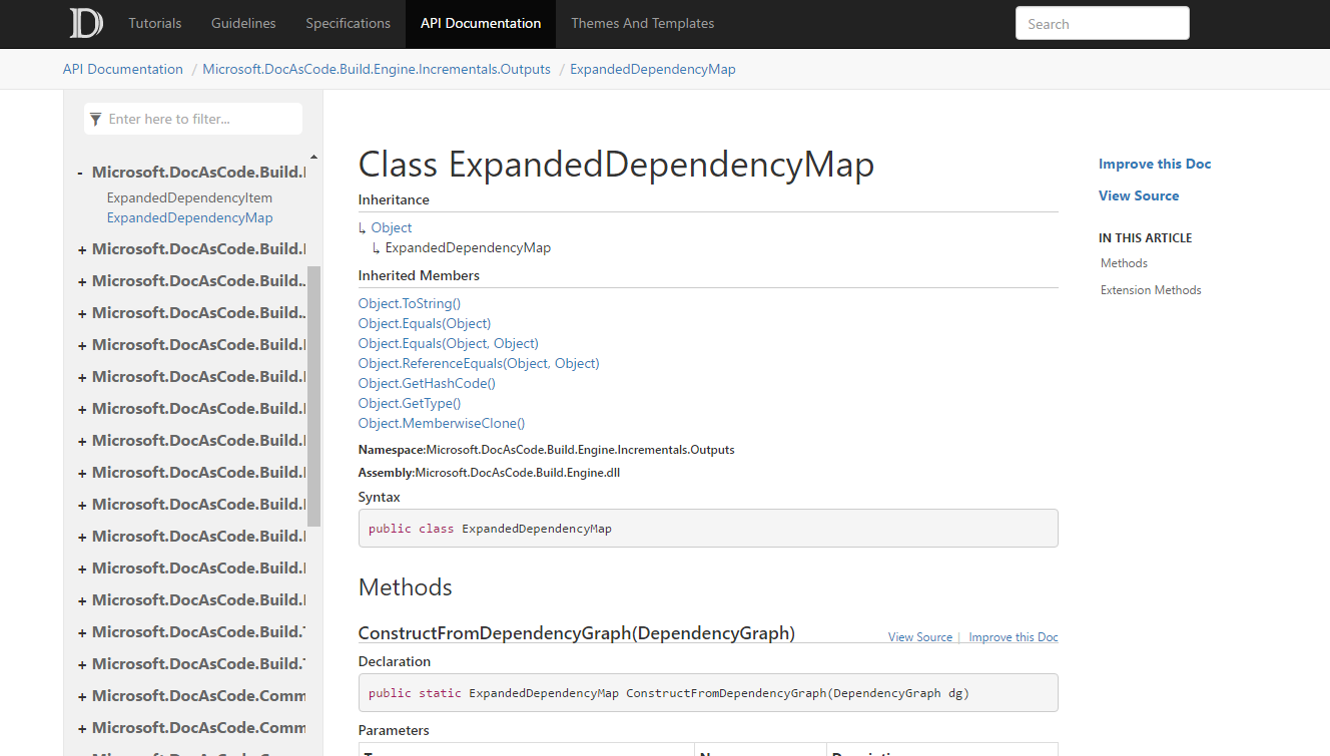
DocFX is an open-source static site generator from Microsoft, specifically designed for creating comprehensive documentation from .NET source code and Markdown files. It excels within the .NET ecosystem by automatically generating detailed API reference documentation directly from triple-slash comments in C# and Visual Basic source code.
As a free and open-source tool, DocFX is entirely self-hosted. It generates static websites suitable for deployment on any web server.
Supported specifications:
C# & VB source comments
Markdown (DFM)
Swagger 2.0 (OpenAPI)
YAML/JSON
DocFX produces basic HTML from Swagger files but notably lacks an interactive “Try It” console for API exploration.
Branding and layout are handled through customizable themes and templates, though complexity can be high.
Versioning is typically managed via source control, as DocFX integrates directly into standard Git and CI/CD based development workflows.
It fits perfectly into CI/CD workflows for automated builds and integrates with source control like Git to enable direct source-linking.
Implementation & Setup:
Install the command-line tool.
Initialize the project.
Configure docfx.json to point to source files.
Run the build command.
Deploy output.
The generator produces a static, multi-page application (MPA) website that is easily hosted and generally SEO-friendly by its nature.
Best Feature: Auto-generates API docs from .NET code comments.
Pros:
Deep, native integration with the .NET ecosystem.
Generates professional, Microsoft-style documentation out-of-the-box.
Extensive customization options through templates and plugins.
Completely free, open-source, and self-hosted for full control.
Strong support for CI/CD pipeline automation.
Cons:
Setup and customization can present a steep learning curve for new users.
Official documentation for the tool itself is sometimes disjointed or incomplete.
Primarily focused on the .NET ecosystem with limited support for other languages.
Best for:
.NET development teams requiring integrated API and conceptual docs.
Organizations wanting full control over self-hosted documentation sites.
Its key differentiator is first-class, unified documentation for .NET.
MkDocs is a fast, simple static site generator for project documentation. Its philosophy centers on simplicity, using Markdown for content and a single YAML file for configuration. It excels at producing clean, professional, and highly functional documentation websites, making it a favorite for developer-focused projects.
As a free, open-source static site generator, MkDocs is self-hosted. The resulting static HTML files can be deployed anywhere.
Markdown / MDX
OpenAPI/AsyncAPI (via plugins)
Core MkDocs lacks native “Try It” functionality, but interactivity can be achieved through its extensive plugin ecosystem.
Extensive customization is possible via themes, plugins, and custom CSS/JS for complete branding control.
Versioning is handled externally through source control like Git, which enables collaborative editing, change tracking, and a clear revision history.
MkDocs integrates perfectly with Git-based workflows and CI/CD pipelines like GitHub Actions for automated builds, streamlining the entire documentation process.
Install via pip.
Initialize a project.
Add Markdown files.
Configure the YAML file.
Build and deploy via CI/CD.
It generates a fully static HTML website; popular themes create a fast, lightweight, and responsive SPA experience with excellent SEO.
Best Feature: Its live preview server provides instant feedback.
Extremely simple setup and developer-friendly Markdown focus.
Fast, lightweight static output is easy to host.
Highly extensible via a rich ecosystem of themes and plugins.
Strong integration with automated Git and CI/CD workflows.
API docs generation requires plugins.
No built-in real-time collaboration features are included.
Advanced customization requires web development skills.
Challenging for non-technical users unfamiliar with Git or Markdown workflows.
Teams committed to a docs-as-code workflow.
Projects needing a fast, simple, and customizable documentation site.
It excels at creating beautiful static sites from Markdown.
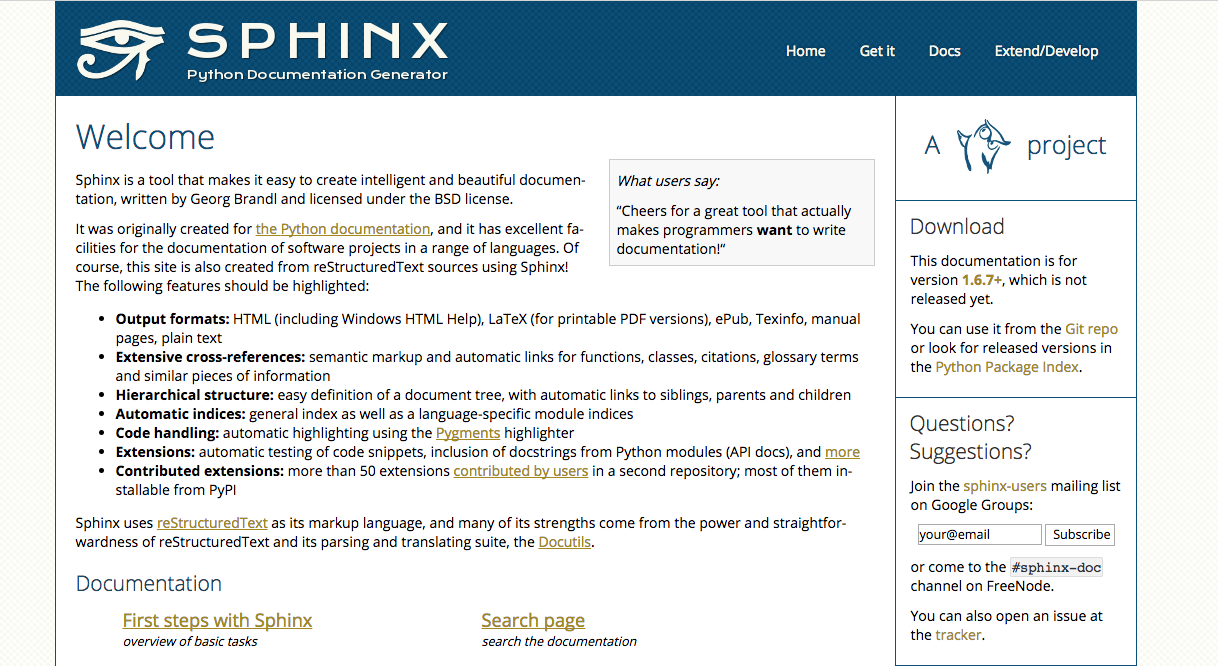
Sphinx is a powerful, open-source documentation generator initially created for Python projects. It builds intelligent, beautiful documentation from plaintext files using reStructuredText or Markdown. Its standout capabilities are its deep extensibility through a rich plugin ecosystem, powerful cross-referencing features, and its ability to generate multiple output formats.
Sphinx is a free, open-source tool under a BSD license. As a static site generator, the resulting documentation can be self-hosted on any web server.
reStructuredText
Markdown (via MyST parser)
OpenAPI (via extensions)
Code (Python, C++, C)
Interactivity is enabled via extensions that embed API explorers like RapiDoc for OpenAPI specifications. Code samples are supported.
Highly customizable with many third-party themes, Sphinx also supports deep customization through templates and CSS.
Versioning is handled via extensions like sphinx-multiversion, which builds documentation from different Git branches and tags. Changelogs can be maintained within the documentation.
As a command-line tool, Sphinx integrates smoothly into any CI/CD pipeline, such as GitHub Actions or GitLab CI, to automate builds and deployments.
Install Sphinx via pip.
Run sphinx-quickstart to create the project structure.
Point to source files and configure extensions.
Run the build command to generate output.
Sphinx generates a performant and SEO-friendly static multi-page application (MPA) in HTML, along with other formats like PDF and ePub.
Best Feature: Its unparalleled extensibility allows for custom functionality.
Extensive cross-referencing capabilities for linking between code and documents, creating a deeply interconnected knowledge base.
Highly extensible with a large ecosystem of plugins that can add nearly any desired functionality.
Generates multiple output formats like HTML, PDF, and ePub from a single source.
Requires learning reStructuredText for its most advanced features, which presents a steeper learning curve.
Default themes can appear dated without significant customization.
Lacks a native interactive API console without installing third-party extensions for that purpose.
Python projects needing to auto-generate documentation from docstrings.
Teams requiring a single source for multiple output formats.
It excels at creating deeply interconnected, content-rich documentation sites.
A modern static API documentation tool must be flexible enough to handle the various standards and content types that make up a rich developer portal.
The foundation of any API reference is the specification file. Leading tools provide robust support for industry standards:
OpenAPI: Formerly known as Swagger, the OpenAPI Specification is the most widely adopted standard for describing REST APIs. Its broad adoption means a massive ecosystem of tools supports it.
AsyncAPI: For event driven architectures, AsyncAPI provides a similar descriptive power for messaging systems, WebSockets, and other asynchronous protocols.
gRPC and Others: Many tools also extend support to other popular frameworks like gRPC (via proto files) and OpenRPC.
API references are essential, but they aren’t enough on their own. Great documentation includes tutorials, getting started guides, and conceptual articles. Nearly every static API documentation tool supports Markdown for creating this supplementary content, allowing writers to focus on the content in a simple, plain text format.
Some modern platforms also expose machine‑readable documentation for AI agents via llms.txt.
Selecting the right tool depends on your team’s specific needs. Here are key factors to consider:
First and foremost, confirm the tool supports your API specification format. Beyond that, evaluate the quality of its code snippet generation. The tool should produce clean, idiomatic code examples in the languages most important to your customers, such as TypeScript, Python, Go, and Java.
Your documentation should feel like a natural extension of your brand. Look for a tool that allows deep customization with custom CSS and JavaScript, and even the ability to use your own React components. This ensures you can create a unique, polished experience that matches your company’s identity, as Cohere did using Fern to perfectly match their brand.
The tool must integrate smoothly into your existing development workflow. A command line interface (CLI) is essential for automating the documentation generation process within your CI/CD pipeline, such as GitHub Actions. This automation is a core tenet of the docs as code approach.
A superior developer experience (DX) is non negotiable. Look for features like an interactive API explorer or “Try It” console that allows developers to make real API calls directly from the documentation. This hands on experience can dramatically speed up their learning and integration process.
Consider the level of support you need. While open source tools can be powerful, they may lack the dedicated support, SLAs, and advanced features like role based access control (RBAC) that enterprises require. Commercial solutions often provide enterprise grade support and features for more complex needs.
Adopting a static API documentation tool fits neatly into a modern DevOps workflow. The process, often called “docs as code,” typically looks like this:
If you’re just getting started, you can set this up in under 5 minutes.
Edit: A developer or technical writer updates the API specification file (e.g., openapi.yaml) or a Markdown guide in their local editor.
Commit: The changes are committed to a Git repository like GitHub.
Pull Request: A pull request is created, allowing for peer review of both the code and the documentation changes together.
Automate: Upon merging the pull request, a CI/CD pipeline automatically triggers. The static API documentation tool runs, generating the fresh HTML, CSS, and JS files, and optionally you can generate a shareable preview link for each PR.
Deploy: The newly generated site is pushed to a hosting provider or CDN, and the updated documentation is live instantly.
This entire process makes documentation a seamless part of development, not an afterthought. For teams looking to implement this without heavy configuration, platforms like Fern offer a streamlined CLI to manage this workflow effortlessly.
If your API is public, its documentation should be easily discoverable through search engines. Optimizing your docs for SEO can attract a highly targeted audience of developers actively looking for solutions.
Clean URLs and Metadata: Use a tool that generates logical, keyword rich URLs for your endpoints and allows you to customize page titles and meta descriptions.
Structured Data: Implement schema markup (like JSON LD) to help search engines understand the technical content of your pages, which can lead to rich snippets in search results.
Fast Load Times: Performance is a major SEO ranking factor. Static sites are inherently fast, giving you a significant advantage. A fast site contributes to a better user experience, which search engines reward.
Use a CDN: Deploying your static files to a global Content Delivery Network ensures that your documentation loads quickly for developers anywhere in the world.
Asset Optimization: Ensure your tool or build process automatically compresses images and minifies CSS and JavaScript files to keep the site lightweight.
For organizations with multiple teams or a growing portfolio of APIs, maintaining consistency and clarity is a major challenge. A good static API documentation tool can help establish strong governance.
Your documentation must make it easy for developers to switch between different versions of your API (e.g., v1, v2, v3). The tool should present versioning in a clear, intuitive way so users always know which version of the documentation they are viewing.
As your company grows, you may have dozens of APIs. A key feature to look for is the ability to create a centralized developer portal or hub that lists all available APIs. This makes it easy for developers to discover all the tools and services you offer from a single, unified entry point.
Security is a primary benefit of the static approach. By generating a site with no active backend or database, you eliminate entire categories of vulnerabilities.
What if your documentation is for an internal or partner only API? You can still use a static API documentation tool. Access control can be managed at the hosting level using:
IP allowlists or VPNs for internal teams.
A proxy or authentication layer that checks for a valid JWT or password before serving the static files.
Some platforms, like the Fern Pro plan, offer built in support for authenticated documentation sites, simplifying this process significantly.
In today’s API first world, documentation is part of the product. A slow, insecure, or out of date documentation site creates friction and drives developers away. A static API documentation tool addresses these problems head on by enabling a workflow that is fast, secure, and deeply integrated with the development process.
By adopting a static, docs as code approach, you ensure your documentation is always accurate, performs beautifully, and provides the world class developer experience your users expect. Ready to build API documentation you’re proud of? Explore how Fern generates beautiful, fast, and reliable docs and takes the pain out of the process.
A static site is pre built into a collection of HTML, CSS, and JavaScript files that are served directly to users, making it very fast and secure. A dynamic site generates each page on demand by running server side code and querying a database, which is slower and more complex.
Yes, it’s excellent for SEO. Static sites are extremely fast, which is a key Google ranking factor. Good tools also allow for customizable URLs, meta tags, and structured data, helping your API docs become more discoverable.
Absolutely. You can host the static site behind a firewall, VPN, or an authentication layer (like a JWT or password check) to restrict access to authorized users.
You update the source files, such as your OpenAPI specification or a Markdown file, and commit the changes to your Git repository. A CI/CD pipeline then automatically runs the static site generator to rebuild and deploy the updated site.
Docs as code is a philosophy where you treat documentation like software. You write it in plain text formats (like Markdown), store it in a version control system like Git, and use automated processes to build and deploy it alongside your application code.
Yes, many modern static API documentation tools include interactive API explorers. These features use JavaScript in the browser to allow users to make live API calls directly from the documentation pages, providing a hands on learning experience.


